

• Home
  • About Us
  • Services
  • Blog
  • Contact
App Roundup: Timesheet Time Tracker
Mar 14
Chief Geek No Response Permalink

App Roundup: Timesheet Time Tracker

Small businesses are everywhere. They keep a community vibrant, relevant and stable while providing services and products that consumers enjoy. Sometimes it’s easy to spot a small business by its quaint storefront or relatively convenient downtown location. However, not all small businesses are so easily recognizable.

Mobile small businesses are equally as important to a community, but lack the visual notice that storefronts offer. Mobile businesses rely many times on by-the-hour compensation with clients who appreciate exacting records of labor costs. Unfortunately, not everything runs by-the-hour and so time can be relative or spread out across periods of time during the completion of projects.

So how can small businesses, self-employed and entrepreneurs track their billable time easily? Well, they could carry around a stopwatch or guesstimate the time based on their arrival and completion. We’ve found a better way in the form of a mobile app – Timesheet.

Timesheet – Time Tracker

App Roundup Timesheet Time Tracker LogoTimesheet – Time Tracker is a free time tracking mobile app that records time spent on Projects and Tasks while neatly organizing them into timeframes with automatically calculated billable totals and workflow statistics.

Skip to the end for an image slideshow of Timesheet screen captures.

Projects

Projects are the top level way of labeling the service performed. They can be named anything you like and are sorted to display open Projects first while maintaining an archive of closed Projects.
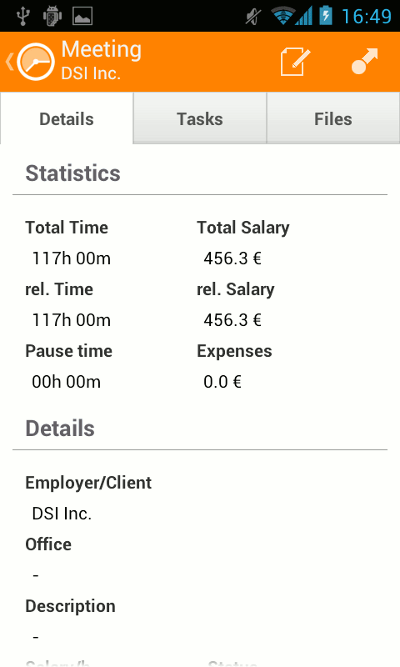
Project Details View

Project Details View

Timesheet organizes all Tasks and details of Projects into an easily readable view.

Each Project includes a description, hourly rate, location, employer/client and automatic tracking label. None of which are mandatory which makes the Project creation process extremely flexible. Location can be determined by a device’s built-in GPS or entered in by hand.

Tasks

Each Task is part of a Project. Users start a task with a simple touch of the screen and Timesheet begins tracking the time until stopped. Tasks can be interrupted for both a break and completion, giving users with longer projects time to grab lunch or a quick snack.
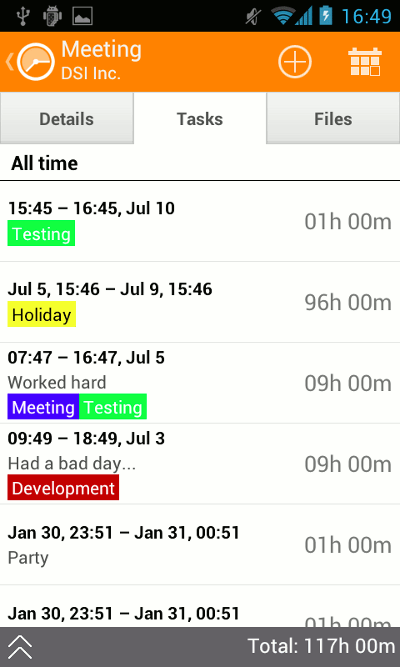
Task List View

Task List View

Tasks are sorted under Projects, tagged, sorted and calculated.

Every completed task requests information on the work performed during that task in the form of description, tags, hourly rate, location and mood. Mood is a way to describe your feeling post-task. Mood may seem like an unnecessary label at first, but I’ve often found it to be a way of illustrating how the task went, regardless of success rate. There is also a field to mark the task Paid.

Along with the basics are Expenses and Notes. Each can be added to Tasks for further completeness. For fast access to projects and tasks, Timesheet also includes a simple widget.

Tracking

Even after just a week of steady client interaction, Timesheet can begin to rack up the statistical data. The Statistics area of Timesheet displays graphs and charts to illustrate how much work has been performed, break usage, frequency etc. All the data is derived from Projects and Tasks to really give insight into one’s workflow.


Revisiting and retrieving data from previous Tasks and Projects is a cinch as well. Timesheet has several predefined time-frames to choose from such as current week, current month and so on along with custom period and custom date to precisely find the time range in question.

Projects can even be sorted by client or project ID to quickly find and reference Timesheet material. Want to analyze the data in a spreadsheet? No problem, Timesheet offers export functionality to an Excel spreadsheet.

Backup

Having all the best records in the world won’t mean much if they’re lost. That’s why Timesheet has a built-in backup feature for use with SD card or through Dropbox.

Timesheet Backup

Timesheet Backup

Backup to the cloud with Dropbox or to an SD card.

I’ve personally used Dropbox because it’s super convenient. Once linked Timesheet backs up to a folder in the Dropbox account in a single .xml file. Timesheet backups can be set on a schedule so that users don’t have to worry about performing them manually. Restoration is equally simple. By just clicking the SD card icon, access to Dropbox files are displayed and with a simple touch of the correct backup file Timesheet is restored.

SD card backup and restoration work much the same way except that the .xml files are stored on the SD card within the device.

Limitations

Timesheet’s backup offering is precise, accurate and fully functional. Having said that, don’t expect syncing between devices. That isn’t yet an option for Timesheet. Currently, best practice from my point of view, for multi-device usage is to use Timesheet from one device (smartphone) and restore the backup file to a secondary device (tablet) weekly to sync, read and analyze documented billable hours.

While not a limitation per say, Timesheet is a bit battery hungry while it’s tracking time. Not too surprising considering it’s an always-on stopwatch while working. Nevertheless, it would be great to see the battery footprint improved if possible.

In the future, we’d love to see some other cloud backup options. Dropbox is great, but it would be fantastic to have options such as Box, SkyDrive or Google Drive as well.

Final Thoughts

In our travels through the app markets, every once in a while we stumble upon a truly great, refined app that does exactly what is intended and exceeds our expectations entirely. Timesheet is one of those rare apps. The precise record keeping, statistical data storage, perfected backup and exceptional data organization means self-employed, small business owners and entrepreneurs can be confident their time is well spent and documented.

We fully recommend Timesheet.

Download Timesheet for Android

If you enjoyed or found this article useful, please show us some support by liking us on Facebook or by sharing us on your favorite social website. Thanks!

Be sure to subscribe to our Newsletter for updates and contest information.

About the author

Chief Geek Chief Geek Chief, as we call him, is editor and head writer at GeekITDown Blog, an IT professional, social media manager and our all around tech guru. When he's not knee deep in all things tech, he's a rabid hockey fan, animal lover and part-time pool shark. More posts by this author
Tweet
Permalink

Related Posts

  • App Roundup: Tekken Card Tournament
    App Roundup: Tekken Card Tournament
  • App Roundup: Toy Story Live Wallpaper
    App Roundup: Toy Story Live Wallpaper
  • Todoist Introduces Karma
    Todoist Introduces Karma
Leave a comment

Your email address will not be published.

Click here to cancel reply.

POST COMMENT

CAPTCHA Image
Refresh Image
*

Search

Find us on Facebook

Newsletter Signup Form

Get all sorts of info on giveaways, special event coverage, promotions and other blog features, delivered to your email inbox!
Subscribe to our free newsletter!

Categories

Puzzled by tech?

Time to GeekITDown!

Recent Comments

  • Susie on Top 5 Things We Dislike About Windows 8
  • Chief Geek on Pin Tab To Taskbar – Internet Explorer 9
  • RazlDazl on Pin Tab To Taskbar – Internet Explorer 9
  • Chief Geek on View Your Complete StumbleUpon History

Recent posts

  • Is Microsoft’s New Xbox The ‘One’ We’ve Been Waiting For?
    Is Microsoft’s New Xbox The ‘One’ We’ve Been Waiting For? This week Microsoft unveiled the next generation of Xbox con...
  • App Roundup: Tekken Card Tournament
    App Roundup: Tekken Card Tournament Tekken Card Tournament has emerged from beta for mobile and ...
  • Evernote: Quick Tips To Get Started
    Evernote: Quick Tips To Get Started If you’re a smartphone owner, then you’re likely...

Search

STAY IN TOUCH

Phone: 352-366-1316 info@geekitdown.com
Follow Us on facebookFollow Us on linkedinFollow Us on pinterestFollow Us on googleFollow Us on rssFollow Us on twitter

  • Home
  • Support
  • Contact
  • Sitemap
  • Privacy
Copyright © 2012 GeekITDown