

GeekITDown Computer Services

  • Home
  • GeekITDown Backup Service Pricing
  • Contact GeekITDown
  • GeekITDown Reviews
  • Checkout
  • Cart
© 2025 | GeekITDown. All rights reserved.
Call Us
352-366-1316
GeekITDown Computer Services & Technology Solutions
  • Home
  • Reviews
  • Blog
  • Services
    • GeekITDown Backup Service Pricing
    • IT Business Services
  • Contact
GeekITDown Computer Services & Technology Solutions

Add Control Panel To Desktop: Windows 8

Home / Blog / Tech / Microsoft / Add Control Panel To Desktop: Windows 8

If you find yourself on the Desktop of Windows 8 a lot and don’t want to keep switching back to the Metro UI to open Control Panel or Windows Explorer, then you’ll probably benefit from adding them as shortcuts to the Desktop.


Add Control Panel and Windows Explorer to Desktop


  • Right-click the desktop and select ‘Personalize’.
  • On the left column of the Personalize screen, click ‘Change desktop icons’.
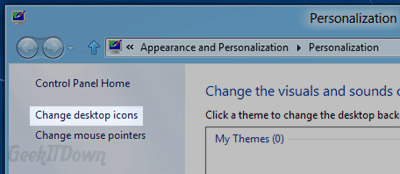
Personalize Desktop Windows 8

  • Place a check next to each item you want to appear on your desktop. For our example we check off ‘Computer’ and ‘Control Panel’.
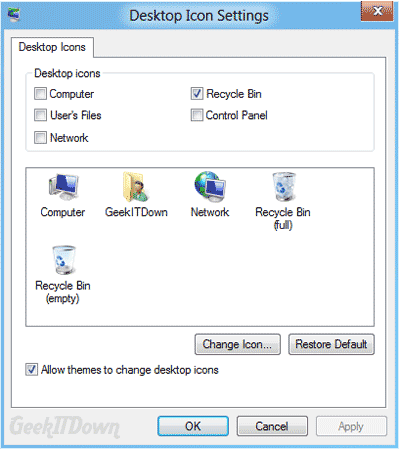
Personalize Desktop Windows 8 2

You can read other Windows 8 related articles on our Windows 8 News page.

If you enjoyed or found this article useful, please show us some support by liking us on Facebook or by sharing us on your favorite social website. Thanks!


118
Like this post

3 Comments

  1. Windows 8 News | GeekITDown Blog
    Reply
    12 October 2011
    Reply
  2. Windows 8 getting a built-in PDF reader, Metro-stylehothotblogs.info – 5 | hothotblogs.info - 5
    Reply
    15 November 2011
    Reply
  3. How to Master Windows 8 | DigLitCoach.com
    Reply
    17 July 2014
    Reply

Leave a Reply (Cancel reply)

Your email address will not be published. Required fields are marked *

*
*

Services

Business Tech Services

Dedicated Backup Services

Home Computer Repairs & Services

Website Design

Information

352.366.1316

GeekITDown on Google

Stay Connected

© 2026 | Website by GeekITDown

Copy
Manage Consent
To provide the best experiences, we use technologies like cookies to store and/or access device information. Consenting to these technologies will allow us to process data such as browsing behavior or unique IDs on this site. Not consenting or withdrawing consent, may adversely affect certain features and functions.
Functional Always active
The technical storage or access is strictly necessary for the legitimate purpose of enabling the use of a specific service explicitly requested by the subscriber or user, or for the sole purpose of carrying out the transmission of a communication over an electronic communications network.
Preferences
The technical storage or access is necessary for the legitimate purpose of storing preferences that are not requested by the subscriber or user.
Statistics
The technical storage or access that is used exclusively for statistical purposes. The technical storage or access that is used exclusively for anonymous statistical purposes. Without a subpoena, voluntary compliance on the part of your Internet Service Provider, or additional records from a third party, information stored or retrieved for this purpose alone cannot usually be used to identify you.
Marketing
The technical storage or access is required to create user profiles to send advertising, or to track the user on a website or across several websites for similar marketing purposes.
  • Manage options
  • Manage services
  • Manage {vendor_count} vendors
  • Read more about these purposes
View preferences
  • {title}
  • {title}
  • {title}