

GeekITDown Computer Services

  • Home
  • GeekITDown Backup Service Pricing
  • Contact GeekITDown
  • GeekITDown Reviews
  • Checkout
  • Cart
© 2025 | GeekITDown. All rights reserved.
Call Us
352-366-1316
GeekITDown Computer Services & Technology Solutions
  • Home
  • Reviews
  • Blog
  • Services
    • GeekITDown Backup Service Pricing
    • IT Business Services
  • Contact
GeekITDown Computer Services & Technology Solutions

Hide Toolbars For Pinned Tabs [Firefox]

Home / Blog / Computers / Browsers / Hide Toolbars For Pinned Tabs [Firefox]

Simply Pinned


If you’re like us, then your Firefox has a number of App Tabs. The phrase “Pin as App Tab” is commonplace among Firefox users these days as the use of App Tabs make navigating to favorite websites much easier. Simply Pinned enhances the focus of those tabs by eliminating extraneous toolbars.

For those unfamiliar with App Tabs, they are favorite websites pinned to the tab bar in a minimalistic fashion so that their screen footprint is small, but always load when Firefox is opened. In a nutshell, they are your favorite websites permanently open in Firefox. Another feature associated with Firefox, like all browsers, are toolbars. Some serve a specific purpose while others are used as browsing companions. While many are useful, they aren’t always needed for every website.
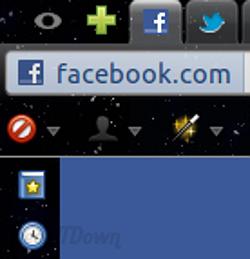
Simply Pinned with Toolbars

Pinned Tabs with Toolbars Visible

Pinned Tabs are often favorite or frequently visited websites and as such their focus is very specific. An example would be Facebook. Many users likely have Facebook pinned and prefer a clean interface while navigating around the social website. For the most part, Facebook users won’t need toolbars like Web Developer or StumbleUpon, etc., but they still want that functionality on other tabs. That’s where Simply Pinned comes in.
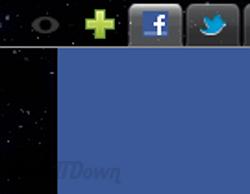
Simply Pinned without Toolbars

Pinned Tabs with Toolbars Hidden

Simply Pinned hides toolbars and sidebars from Pinned Tabs to provide more screen real estate for those favorite websites. Simply Pinned is a simple install that automatically recognizes which tabs are pinned and hides all extraneous information inside the tab to deliver a clean minimalistic website view. Simply Pinned hides the address bar, menu bar, bookmarks bar, add-on toolbars, sidebars and any other in browser distractions so that users can focus solely on the pinned website.

Users can toggle the toolbars on and off, so although the toolbars are hidden by default, they can be shown with the click of a button. Simply Pinned uses an icon or key combination which can be used to toggle the view on and off. There are several options available for choosing which toolbars are to be hidden, but for the most part Simply Pinned is a small extension that does what’s intended without a lot of fanfair.

Download Simply Pinned for Firefox

If you enjoyed or found this article useful, please show us some support by liking us on Facebook or by sharing us on your favorite social website. Thanks!


154
Like this post

1 Comment

  1. Carlos
    Reply
    27 April 2012

    Perfect awesome Simple, thank you soooo much for this, exactly what I needed, glad google put you as the first result when searching for this feature.

    Reply

Leave a Reply (Cancel reply)

Your email address will not be published. Required fields are marked *

*
*

Services

Business Tech Services

Dedicated Backup Services

Home Computer Repairs & Services

Website Design

Information

352.366.1316

GeekITDown on Google

Stay Connected

© 2026 | Website by GeekITDown

Copy
Manage Consent
To provide the best experiences, we use technologies like cookies to store and/or access device information. Consenting to these technologies will allow us to process data such as browsing behavior or unique IDs on this site. Not consenting or withdrawing consent, may adversely affect certain features and functions.
Functional Always active
The technical storage or access is strictly necessary for the legitimate purpose of enabling the use of a specific service explicitly requested by the subscriber or user, or for the sole purpose of carrying out the transmission of a communication over an electronic communications network.
Preferences
The technical storage or access is necessary for the legitimate purpose of storing preferences that are not requested by the subscriber or user.
Statistics
The technical storage or access that is used exclusively for statistical purposes. The technical storage or access that is used exclusively for anonymous statistical purposes. Without a subpoena, voluntary compliance on the part of your Internet Service Provider, or additional records from a third party, information stored or retrieved for this purpose alone cannot usually be used to identify you.
Marketing
The technical storage or access is required to create user profiles to send advertising, or to track the user on a website or across several websites for similar marketing purposes.
  • Manage options
  • Manage services
  • Manage {vendor_count} vendors
  • Read more about these purposes
View preferences
  • {title}
  • {title}
  • {title}