

GeekITDown Computer Services

  • Home
  • GeekITDown Backup Service Pricing
  • Contact GeekITDown
  • GeekITDown Reviews
  • Checkout
  • Cart
© 2025 | GeekITDown. All rights reserved.
Call Us
352-366-1316
GeekITDown Computer Services & Technology Solutions
  • Home
  • Reviews
  • Blog
  • Services
    • GeekITDown Backup Service Pricing
    • IT Business Services
  • Contact
GeekITDown Computer Services & Technology Solutions

Search YouTube In The Background

Home / Blog / Computers / Browsers / Search YouTube In The Background

If you enjoy watching videos on YouTube, you’ve probably been annoyed by the inability to natively search for videos while simultaneously watching one. Good news, now there’s an extension for Chrome that allows you to search and watch videos at the same time.


YT Background Search


YT Background Search is a Chrome extension that adds a ‘BG Search’ button next to the YouTube search box. Simply search for a video as usual, except click the ‘BG Search’ button instead of the traditional search button.
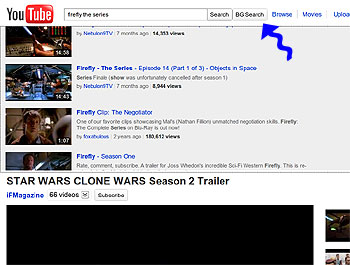
YT Background Search

The search results are displayed in a split screen format with the current video pane on the bottom and the new YT Background Search pane at the top. The search results are unaltered and display just as they would during a traditional YouTube search.

Download YT Background Search

If you enjoyed or found this article useful, please show us some support by liking us on Facebook or by sharing us on your favorite social website. Thanks!


123
Like this post

Leave a Reply (Cancel reply)

Your email address will not be published. Required fields are marked *

*
*

Services

Business Tech Services

Dedicated Backup Services

Home Computer Repairs & Services

Website Design

Information

352.366.1316

GeekITDown on Google

Stay Connected

© 2026 | Website by GeekITDown

Copy
Manage Consent
To provide the best experiences, we use technologies like cookies to store and/or access device information. Consenting to these technologies will allow us to process data such as browsing behavior or unique IDs on this site. Not consenting or withdrawing consent, may adversely affect certain features and functions.
Functional Always active
The technical storage or access is strictly necessary for the legitimate purpose of enabling the use of a specific service explicitly requested by the subscriber or user, or for the sole purpose of carrying out the transmission of a communication over an electronic communications network.
Preferences
The technical storage or access is necessary for the legitimate purpose of storing preferences that are not requested by the subscriber or user.
Statistics
The technical storage or access that is used exclusively for statistical purposes. The technical storage or access that is used exclusively for anonymous statistical purposes. Without a subpoena, voluntary compliance on the part of your Internet Service Provider, or additional records from a third party, information stored or retrieved for this purpose alone cannot usually be used to identify you.
Marketing
The technical storage or access is required to create user profiles to send advertising, or to track the user on a website or across several websites for similar marketing purposes.
  • Manage options
  • Manage services
  • Manage {vendor_count} vendors
  • Read more about these purposes
View preferences
  • {title}
  • {title}
  • {title}