

GeekITDown Computer Services

  • Home
  • GeekITDown Backup Service Pricing
  • Contact GeekITDown
  • GeekITDown Reviews
  • Checkout
  • Cart
© 2025 | GeekITDown. All rights reserved.
Call Us
352-366-1316
GeekITDown Computer Services & Technology Solutions
  • Home
  • Reviews
  • Blog
  • Services
    • GeekITDown Backup Service Pricing
    • IT Business Services
  • Contact
GeekITDown Computer Services & Technology Solutions

Drag, Drop And Share Files Through Droplr

Home / Blog / Features / Drag, Drop And Share Files Through Droplr

Droplr


Need to share files with others? No problem, Droplr is here to help. Like other quick file share sites, Droplr uses links to deliver the information to friends or co-workers. Droplr is different because it integrates so seamlessly with iPhone and functions so smoothly.

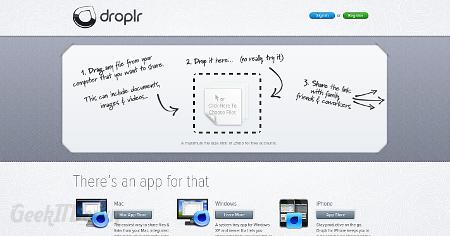
Droplr files are shared quickly by providing file recipients with a shortlink created by the Droplr system. Certainly that’s easy, but Droplr really makes things simple on the front-end of the service as well. To add a file for sharing, simply drag the file over the Droplr window and drop it. It is a quick and efficient way of transferring any type of file.

Droplr file size is limited to 25MB for free accounts. Paid accounts include custom domain options and larger file size limits. Droplr works on Mac and Windows XP or newer operating systems as well as a free Droplr app for iPhone. Droplr is a welcome app for sharing documents wherever you are from your mobile device.
Nifty Websites Collection Droplr

Visit Droplr

If you enjoyed or found this article useful, please show us some support by liking us on Facebook or by sharing us on your favorite social website. Thanks!

Make Your Website Part Of The Nifty Collection


95
Like this post

Leave a Reply (Cancel reply)

Your email address will not be published. Required fields are marked *

*
*

Services

Business Tech Services

Dedicated Backup Services

Home Computer Repairs & Services

Website Design

Information

352.366.1316

GeekITDown on Google

Stay Connected

© 2026 | Website by GeekITDown

Copy
Manage Consent
To provide the best experiences, we use technologies like cookies to store and/or access device information. Consenting to these technologies will allow us to process data such as browsing behavior or unique IDs on this site. Not consenting or withdrawing consent, may adversely affect certain features and functions.
Functional Always active
The technical storage or access is strictly necessary for the legitimate purpose of enabling the use of a specific service explicitly requested by the subscriber or user, or for the sole purpose of carrying out the transmission of a communication over an electronic communications network.
Preferences
The technical storage or access is necessary for the legitimate purpose of storing preferences that are not requested by the subscriber or user.
Statistics
The technical storage or access that is used exclusively for statistical purposes. The technical storage or access that is used exclusively for anonymous statistical purposes. Without a subpoena, voluntary compliance on the part of your Internet Service Provider, or additional records from a third party, information stored or retrieved for this purpose alone cannot usually be used to identify you.
Marketing
The technical storage or access is required to create user profiles to send advertising, or to track the user on a website or across several websites for similar marketing purposes.
  • Manage options
  • Manage services
  • Manage {vendor_count} vendors
  • Read more about these purposes
View preferences
  • {title}
  • {title}
  • {title}